
Create milestone countdowns with flexible event details
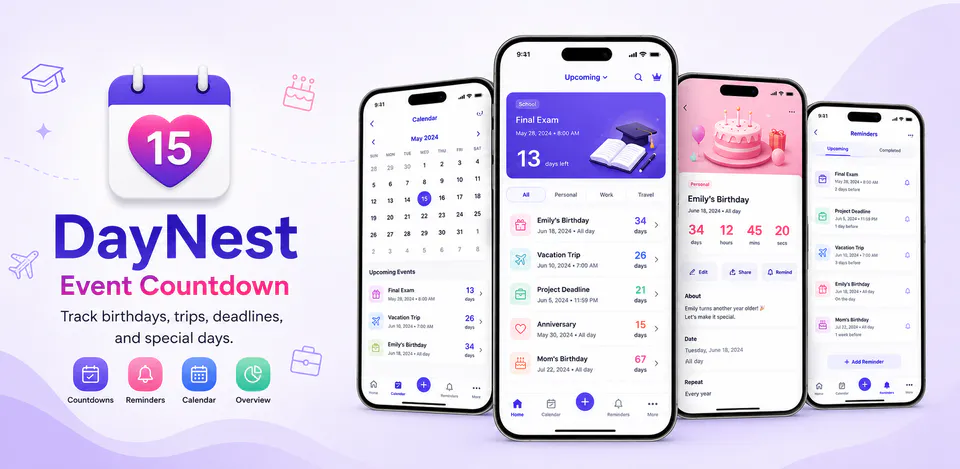
Add birthdays, exams, deadlines, travel plans, and personal dates with titles, notes, categories, icons, colors, reminder timing, and repeat rules that stay easy to manage on mobile.

Productivity
DayNest is built to keep important dates visible without turning them into a heavy planning system. The reviewed project centers on countdown creation, upcoming and completed event tracking, category filters, search, local reminders, calendar and statistics views, and an Android home-screen widget, while keeping the core event data on the device instead of behind an account.
Why DayNest
Add birthdays, exams, deadlines, travel plans, and personal dates with titles, notes, categories, icons, colors, reminder timing, and repeat rules that stay easy to manage on mobile.
DayNest organizes upcoming and completed events through a home dashboard, quick search, category filters, calendar browsing, and lightweight statistics so your next milestone is easier to find.
The reviewed Android build schedules local reminder notifications, supports deep links into event details, and refreshes a home-screen widget with your next countdown without requiring an account-based sync service.
A local-first countdown tracker with reminders, calendar browsing, milestone stats, and an Android home-screen widget.

Android workflow
Create countdowns for birthdays, exams, project deadlines, trips, anniversaries, and other personal milestones from one focused flow.
DayNest screens


DayNest quality
Add birthdays, exams, deadlines, travel plans, and personal dates with titles, notes, categories, icons, colors, reminder timing, and repeat rules that stay easy to manage on mobile.
DayNest privacy
DayNest has a dedicated policy describing local storage, permissions, online services, account features, and deletion controls that apply to the product.
What’s new
DayNest updates and fixes are shared here when release notes are available.
View all updates arrow_forwardTechnical information
Need help?
Include your device model, Android version, app version, and screenshots when possible.
Open supportEmail supportMore apps you might like

A retail catalog and inventory app for Jeaneth Store with customer browsing, cart flows, admin orders, and stock control.

A local Android sound toolkit for playback enhancement, equalizer presets, speaker checks, and private audio tests.

A precise Android metronome for tempo practice, tap tempo, beat setup, and background playback.