

Clean pasted text in one step
Remove extra spaces, collapse broken lines, trim empty gaps, and optionally copy the cleaned result right after processing.

Productivity
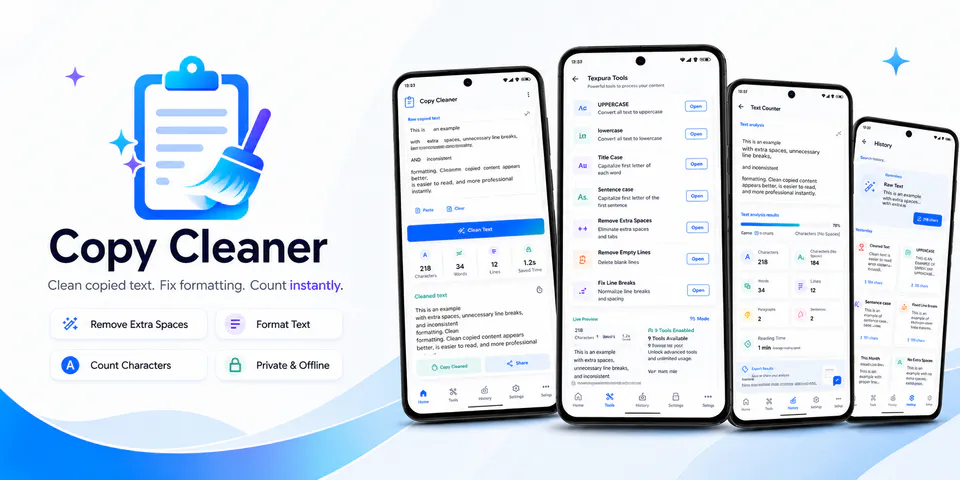
Texpura is built for people who regularly paste messy text from chats, PDFs, notes, or documents and want it cleaned up fast on mobile. It combines one-tap cleanup, quick format tools, text statistics, reusable presets, and optional on-device history in an experience designed to stay lightweight and privacy-aware.
Why Texpura
Remove extra spaces, collapse broken lines, trim empty gaps, and optionally copy the cleaned result right after processing.
Move from quick cleanup to casing tools, paragraph fixes, PDF or email presets, and built-in counts for words, lines, paragraphs, and reading time.
Current text, cleaned output, recent presets, settings, and optional history are designed to stay in local app storage instead of a developer-run account system.
A text-cleaning utility with one-tap cleanup, format tools, word counts, presets, and optional local history.
Android workflow
Drop in text from a document, message, or note and run a cleaner flow that is built for quick mobile fixes.
Texpura screens
Texpura quality
Remove extra spaces, collapse broken lines, trim empty gaps, and optionally copy the cleaned result right after processing.
Texpura privacy
Texpura has a dedicated policy describing local storage, permissions, online services, account features, and deletion controls that apply to the product.
What’s new
Texpura updates and fixes are shared here when release notes are available.
View all updates arrow_forwardTechnical information
Need help?
Include your device model, Android version, app version, and screenshots when possible.
Open supportEmail supportMore apps you might like

A retail catalog and inventory app for Jeaneth Store with customer browsing, cart flows, admin orders, and stock control.

A local Android sound toolkit for playback enhancement, equalizer presets, speaker checks, and private audio tests.

A precise Android metronome for tempo practice, tap tempo, beat setup, and background playback.