
Switch between standard and scientific modes
Handle everyday arithmetic or move into trigonometry, logarithms, roots, powers, constants, factorials, percentages, and Ans memory from the same calculator flow.

Utilities
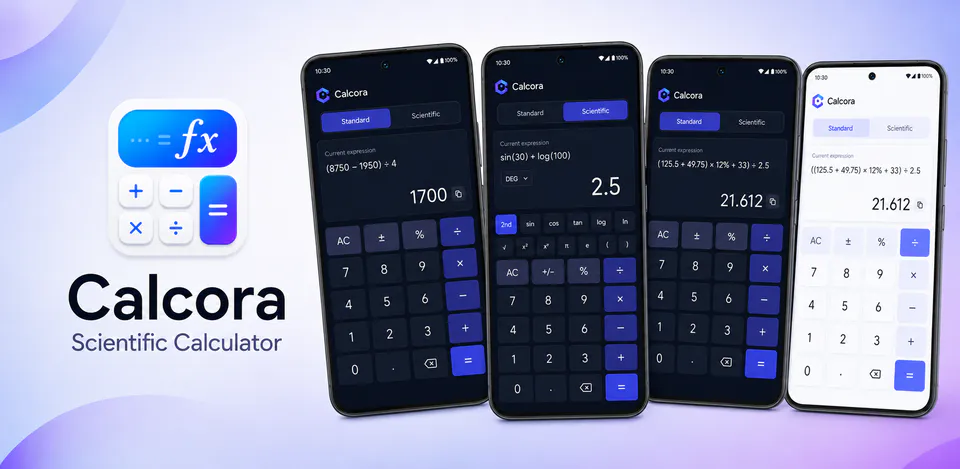
Calcora is built to cover both quick daily math and more advanced calculator work from the same polished mobile experience. It combines standard arithmetic, scientific functions, local history, copy actions, and device-stored preferences so calculations stay fast, readable, and available even without a network connection.
Why Calcora
Handle everyday arithmetic or move into trigonometry, logarithms, roots, powers, constants, factorials, percentages, and Ans memory from the same calculator flow.
History search, filters, reuse, copy, delete, and clear actions make it easier to revisit earlier results without sending them to a remote account system.
Theme mode, angle unit, decimal precision, vibration, sound preference, and history visibility are designed to stay saved on the device for faster repeat use.
A scientific calculator app with everyday arithmetic, advanced functions, local history, and customizable settings.

Android workflow
Use the standard keypad for regular arithmetic, percentages, decimals, and quick totals without extra setup.
Calcora screens


Calcora quality
Handle everyday arithmetic or move into trigonometry, logarithms, roots, powers, constants, factorials, percentages, and Ans memory from the same calculator flow.
Calcora privacy
Calcora has a dedicated policy describing local storage, permissions, online services, account features, and deletion controls that apply to the product.
What’s new
Calcora updates and fixes are shared here when release notes are available.
View all updates arrow_forwardTechnical information
Need help?
Include your device model, Android version, app version, and screenshots when possible.
Open supportEmail supportMore apps you might like

A retail catalog and inventory app for Jeaneth Store with customer browsing, cart flows, admin orders, and stock control.

A local Android sound toolkit for playback enhancement, equalizer presets, speaker checks, and private audio tests.

A precise Android metronome for tempo practice, tap tempo, beat setup, and background playback.