
Choose any screen-light color
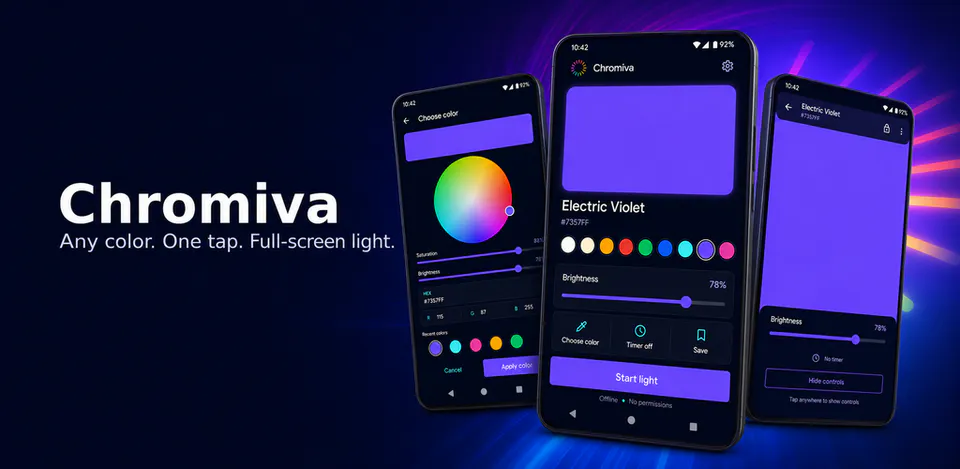
Pick colors from a full hue and saturation disc, enter HEX or RGB values, use presets, revisit recent colors, and save favorites for fast reuse.

Utilities
Chromiva is a local-first Android color light utility for turning the screen into a chosen color lamp, ambience panel, or full-screen soft light. It includes a hue and saturation picker, HEX and RGB controls, color presets, recent colors, favorites, selected-color previews, brightness controls, timer options, active full-screen light mode, lock and control visibility states, dark, system, and light themes, settings, and local preferences without Internet permission, analytics, ads, or runtime permissions.
Why Chromiva
Pick colors from a full hue and saturation disc, enter HEX or RGB values, use presets, revisit recent colors, and save favorites for fast reuse.
Start an active color-light session with brightness controls, optional timer behavior, lock controls, hideable panels, and high-contrast status text.
Chromiva stores color and appearance settings locally and is designed without Internet permission, analytics, ads, or runtime permissions.
A local-first color light app with hue and saturation picking, HEX and RGB controls, recent colors, favorites, brightness and timer controls, active full-screen light mode, themes, settings, and no Internet permission, analytics, ads, or runtime permissions.

Android workflow
The controller screen keeps the current color, swatches, brightness, timer, save action, and start-light command close together.
Chromiva screens


Chromiva quality
Pick colors from a full hue and saturation disc, enter HEX or RGB values, use presets, revisit recent colors, and save favorites for fast reuse.
Chromiva privacy
Chromiva has a dedicated policy describing local storage, permissions, online services, account features, and deletion controls that apply to the product.
What’s new
Chromiva updates and fixes are shared here when release notes are available.
View all updates arrow_forwardTechnical information
Need help?
Include your device model, Android version, app version, and screenshots when possible.
Open supportEmail supportMore apps you might like

A retail catalog and inventory app for Jeaneth Store with customer browsing, cart flows, admin orders, and stock control.

A local Android sound toolkit for playback enhancement, equalizer presets, speaker checks, and private audio tests.

A precise Android metronome for tempo practice, tap tempo, beat setup, and background playback.