
Daily usage visibility
Review Android usage summaries and app-level activity in a layout that turns on-device data into something easier to act on.

Wellness
Limitly is built to help people understand device habits and create better boundaries. It brings together screen-time summaries, app-level limits, focus tools, local exports, backups, and widgets in a product that stays grounded in personal ownership, local data, and no Firebase Analytics, Crashlytics, cloud sync, or developer account.
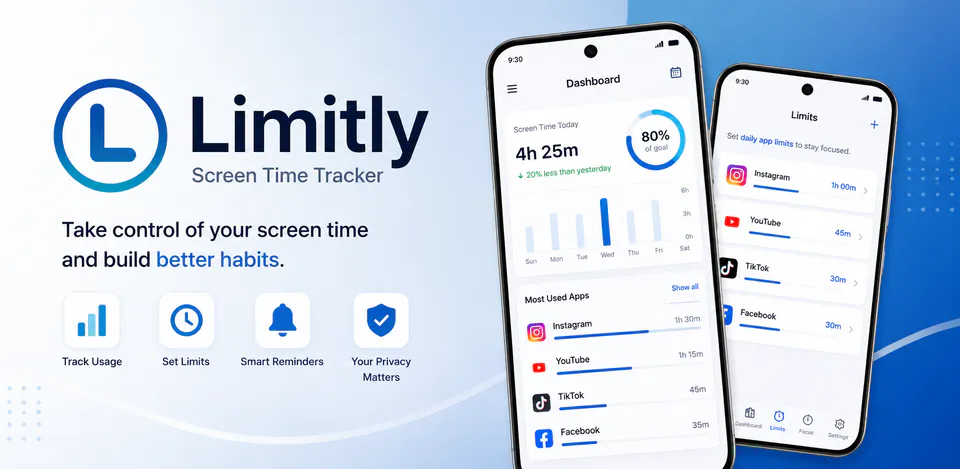
Limitly screen-time dashboard
Review Android usage summaries and app-level activity in a layout that turns on-device data into something easier to act on.
Create app limits and reminders that support healthier usage habits without making the experience feel punitive.
Use focus flows, local notifications, and optional accessibility-based blocking to support study blocks, work sprints, or calmer downtime.
A private digital wellbeing app for tracking screen time, setting app limits, running focus sessions, and keeping usage records on the device.
Daily usage
Limitly uses Android usage information to show today totals, app activity, first-opened and last-opened times, sessions, hourly patterns, limits, focus mode, and reminders.
Limitly screens
Usage accuracy
Recent releases improved restart handling, today's usage calculations, sessions, hourly tracking, daily limits, and first-opened or last-opened timestamps.
Limitly permissions
Limitly uses Android Usage Access to calculate app usage and optional Accessibility Service access to enforce limits or Focus Mode on selected apps. The Play listing says usage and foreground-app information is processed locally and is not sold, used for advertising, or shared with third parties.
What’s new
Limitly 1.5.4 fixed inflated screen-time totals after device restart, improved today usage calculation from app activity data, strengthened session, hourly, first-opened, and last-opened tracking, and improved daily-limit accuracy around screen-off and shutdown behavior.
View all updates arrow_forwardTechnical information
Need help?
Include your device model, Android version, app version, and screenshots when possible.
Open supportEmail supportMore apps you might like
A retail catalog and inventory app for Jeaneth Store with customer browsing, cart flows, admin orders, and stock control.

A local name badge maker for styled names, fullscreen display, saved badges, and event-ready visuals.

A polished score counter for players, matches, history, and winner tracking.