
Design a readable name badge
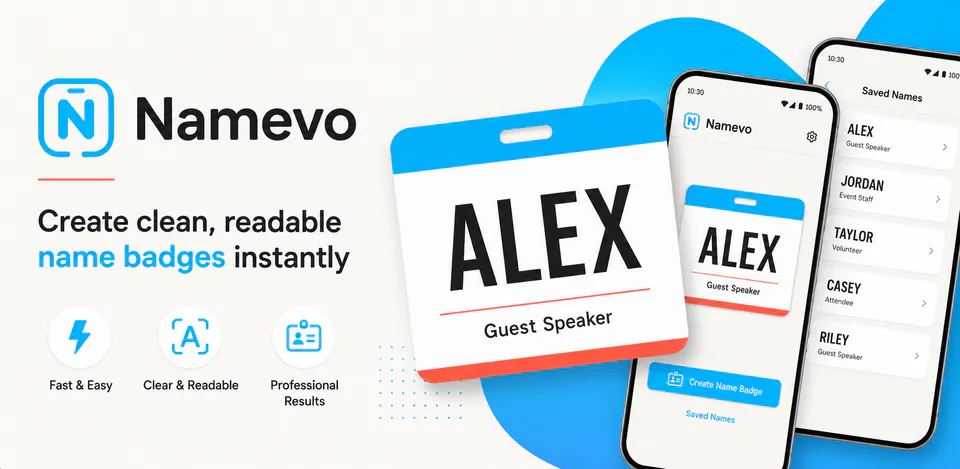
Enter a name, optional subtitle, choose badge themes, fonts, text size, colors, and preview how the badge will look on small phones, tablets, and landscape layouts.

Productivity
Namevo is a local-first Android name badge maker for turning names and short subtitles into styled badge cards and fullscreen displays. It includes an editor, validation states, live preview, theme, font, size, color, and style controls, saved names, edit flows, settings, about and privacy screens, responsive phone or tablet layouts, immersive fullscreen mode, haptics, and local-only SharedPreferences storage without accounts, ads, analytics, tracking, advertising ID, Internet permission, or cloud backup.
Why Namevo
Enter a name, optional subtitle, choose badge themes, fonts, text size, colors, and preview how the badge will look on small phones, tablets, and landscape layouts.
Use immersive fullscreen display with long-name fitting, temporary brightness boost, rotation handling, keep-awake behavior, and controls that can be revealed when needed.
Saved names, style choices, display preferences, and settings stay in local app storage and can be cleared from the app without network access.
A local-first badge display app with a name editor, style themes, font and color choices, responsive previews, fullscreen presentation, saved names, local settings, haptics, and no account, ads, analytics, tracking, advertising ID, Internet permission, or cloud backup.

Android workflow
The editor keeps form fields, preview, validation, and style actions together so a badge can be prepared quickly.
Namevo screens


Namevo quality
Enter a name, optional subtitle, choose badge themes, fonts, text size, colors, and preview how the badge will look on small phones, tablets, and landscape layouts.
Namevo privacy
Namevo has a dedicated policy describing local storage, permissions, online services, account features, and deletion controls that apply to the product.
What’s new
Namevo updates and fixes are shared here when release notes are available.
View all updates arrow_forwardTechnical information
Need help?
Include your device model, Android version, app version, and screenshots when possible.
Open supportEmail supportMore apps you might like
A retail catalog and inventory app for Jeaneth Store with customer browsing, cart flows, admin orders, and stock control.

A local Android sound toolkit for playback enhancement, equalizer presets, speaker checks, and private audio tests.

A precise Android metronome for tempo practice, tap tempo, beat setup, and background playback.