

Generate single numbers or full sets
Use quick generation for one result or switch to the main generator for custom quantity, duplicate rules, excluded numbers, and sorting.

Utilities
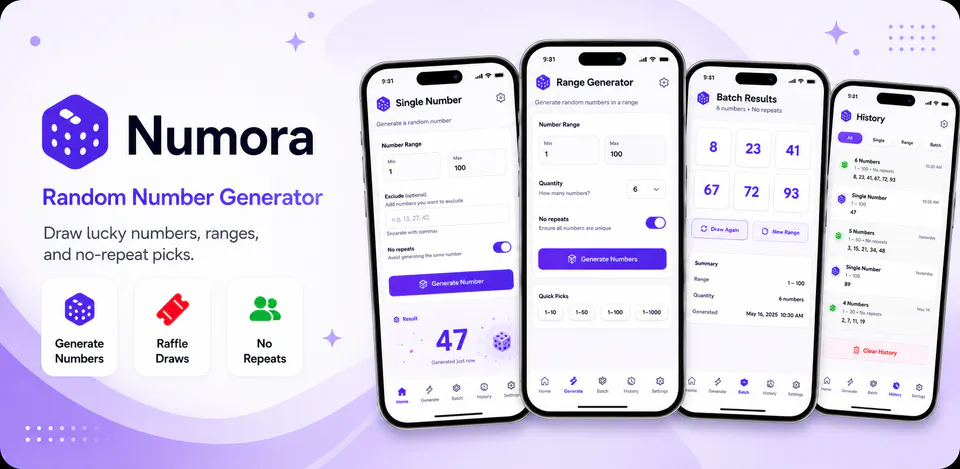
Numora is built to make number-based picks feel more polished on mobile. It combines quick single draws, multi-number generation, raffle winner selection, no-repeat sessions, lucky-number sets, and batch outputs in one focused interface while keeping core generation logic on-device.
Why Numora
Use quick generation for one result or switch to the main generator for custom quantity, duplicate rules, excluded numbers, and sorting.
Draw one or more winners from a ticket range, remove winners from the pool when needed, and keep a no-repeat session going until the range is exhausted or reset.
Lucky-number sets, batch generation, presets, history views, and saved interface preferences are designed to make repeat use feel fast and familiar.
A random number app with quick generate, raffle draws, lucky sets, batch generation, presets, and session-based history.

Android workflow
Open Numora, set a minimum and maximum value, and generate a random number right from the home screen.
Numora screens


Numora quality
Use quick generation for one result or switch to the main generator for custom quantity, duplicate rules, excluded numbers, and sorting.
Numora privacy
Numora has a dedicated policy describing local storage, permissions, online services, account features, and deletion controls that apply to the product.
What’s new
Numora updates and fixes are shared here when release notes are available.
View all updates arrow_forwardTechnical information
Need help?
Include your device model, Android version, app version, and screenshots when possible.
Open supportEmail supportMore apps you might like

A retail catalog and inventory app for Jeaneth Store with customer browsing, cart flows, admin orders, and stock control.

A local Android sound toolkit for playback enhancement, equalizer presets, speaker checks, and private audio tests.

A precise Android metronome for tempo practice, tap tempo, beat setup, and background playback.