
Foreground camera scanning
Use the camera while actively scanning QR codes in real time without background camera access.

Utilities
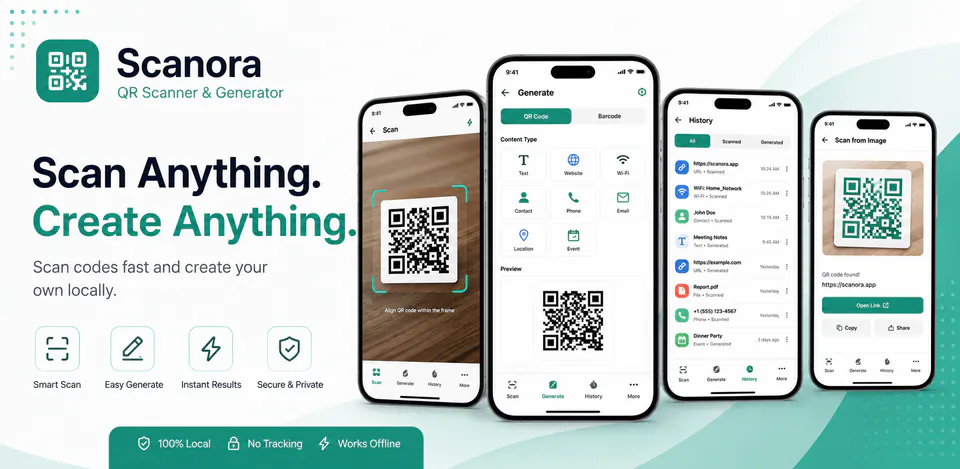
Scanora is built for people who want a focused QR workflow in one app. It scans QR codes with the camera, lets users choose an image through the system picker for optional image-based scanning, saves scan history locally on the device, and generates QR codes for common content types.
Why Scanora
Use the camera while actively scanning QR codes in real time without background camera access.
Choose a single image through the system picker when you want to scan a QR code from an existing photo or file.
Scan history stays on the device, and QR generation supports common formats like text, links, email, phone, SMS, Wi-Fi, contact, and location.
A QR utility app for live camera scanning, QR generation, local scan history, and optional gallery-image scanning.

Android workflow
Open the scanner, grant camera access when needed, and scan codes directly from the live camera view.
Scanora screens


Scanora quality
Use the camera while actively scanning QR codes in real time without background camera access.
Scanora privacy
Scanora has a dedicated policy describing local storage, permissions, online services, account features, and deletion controls that apply to the product.
What’s new
Scanora improved scanner accuracy so QR codes and barcodes are detected only when positioned inside the scan frame, added automatic migration of compatible scan history, settings, and saved templates, preserved existing Kotlin data without duplicate migration, and improved startup reliability.
View all updates arrow_forwardTechnical information
Need help?
Include your device model, Android version, app version, and screenshots when possible.
Open supportEmail supportMore apps you might like

A retail catalog and inventory app for Jeaneth Store with customer browsing, cart flows, admin orders, and stock control.

A local Android sound toolkit for playback enhancement, equalizer presets, speaker checks, and private audio tests.

A precise Android metronome for tempo practice, tap tempo, beat setup, and background playback.