
Keep size profiles for each person
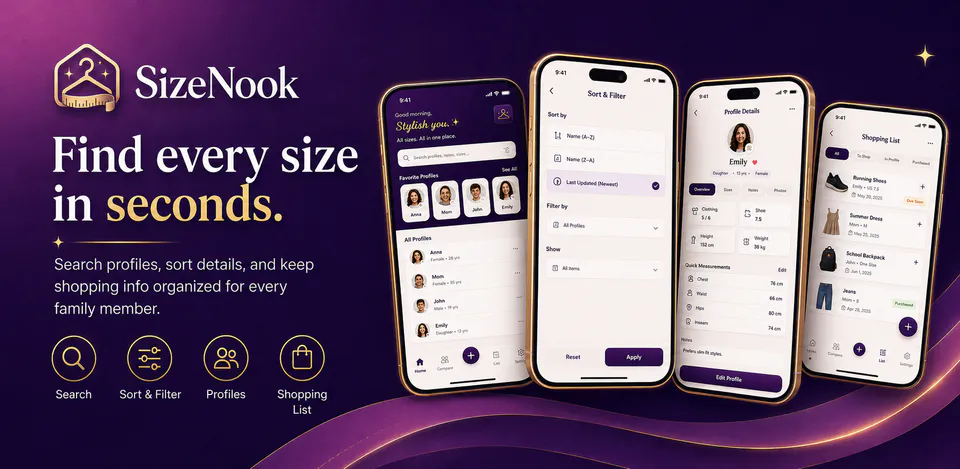
Save names, relationships, ages, profile photos, favorite profiles, clothing sizes, shoe sizes, body measurements, and fit notes so sizing details stay easy to find.

Lifestyle
SizeNook is built for people who shop for themselves, family members, or repeat profile groups and need clothing sizes, shoe sizes, body measurements, and shopping notes in one local-first place. The reviewed project centers on searchable size profiles, category views, profile details, shopping reminders with photos and due dates, import/export, dark mode, and Android-friendly navigation.
Why SizeNook
Save names, relationships, ages, profile photos, favorite profiles, clothing sizes, shoe sizes, body measurements, and fit notes so sizing details stay easy to find.
Move through all profiles, favorite profiles, clothing sizes, shoe sizes, body measurements, and shopping notes with filters built for quick repeat checks.
Create shopping items with profile links, preferred sizes, photos, notes, priority, due dates, purchased status, and local JSON or CSV backup flows.
A private size profile and shopping-note app with searchable family profiles, clothing and shoe sizes, body measurements, reminders, photos, and local import/export.

Android workflow
Open SizeNook to search saved profiles, jump into favorites, and scan size notes without digging through separate messages or notes.
SizeNook screens


SizeNook quality
Save names, relationships, ages, profile photos, favorite profiles, clothing sizes, shoe sizes, body measurements, and fit notes so sizing details stay easy to find.
SizeNook privacy
SizeNook has a dedicated policy describing local storage, permissions, online services, account features, and deletion controls that apply to the product.
What’s new
SizeNook updates and fixes are shared here when release notes are available.
View all updates arrow_forwardTechnical information
Need help?
Include your device model, Android version, app version, and screenshots when possible.
Open supportEmail supportMore apps you might like

A retail catalog and inventory app for Jeaneth Store with customer browsing, cart flows, admin orders, and stock control.

A local Android sound toolkit for playback enhancement, equalizer presets, speaker checks, and private audio tests.

A precise Android metronome for tempo practice, tap tempo, beat setup, and background playback.